Budget Spreadsheets That Fill Themselves In (Matched to How You Get Paid)
Budget spreadsheet setup for any pay schedule: one transaction list feeds the month, paycheck view, bill calendar and yearly totals, shown on a $3,900 month.
By Ultimate Budget Planner by Cosmo Suite · Editorial policy
Published · 9 min read
Most budget spreadsheets get abandoned for one of three reasons. The sheet was built around a monthly salary, and you are paid every other Friday. The same rent payment has to be typed into three tabs. Or the file lives on a laptop, so purchases pile up until Sunday and the numbers stop matching your bank.
All three come down to how the sheet is wired. In other words, a sheet that asks you to type the same thing twice falls behind within a few weeks.
So a working budget spreadsheet is a wiring problem first. Every dollar gets entered once, on one list, and every other view reads from that list. That holds whether you build it yourself or start from a budget spreadsheet where every tab reads from one transaction list.
Below is that wiring, demonstrated on one ordinary month for a reader paid $1,950 every two weeks, in the order you would build it.
Key takeaways
- Enter each transaction once. The month, the paycheck view, the bill calendar and the yearly totals should all read from that one list.
- Plan the ordinary month on two paychecks ($3,900 in the example), not on the yearly average of $4,225.
- Group bills by the paycheck that pays them. A month can balance while one pay period runs dry.
- Housing was 33.4% of average household spending in 2024, so the rent date shapes the whole plan (BLS).
One Transaction List Has to Feed Every Other Tab
A budget spreadsheet works when a single list of transactions feeds the monthly budget, the paycheck view, the bill calendar and the yearly totals. If any of those tabs asks for its own typing, it falls out of step within a month.
A budget spreadsheet is a file that compares the money you plan to spend with the money you did spend, category by category. The government's consumer.gov budget guide boils it down to three steps: list your expenses, work out your monthly income, and subtract one from the other. However, the trouble starts when those steps live on separate, disconnected tabs.
Look at a typical free template, for example. There is a monthly tab where you type planned and actual amounts, and maybe a second tab for the year. The yearly tab is either typed again or linked by hand to twelve monthly cells. Add a credit card and a paycheck that does not land on the 1st. As a result, you are maintaining four separate spreadsheets that are supposed to agree.
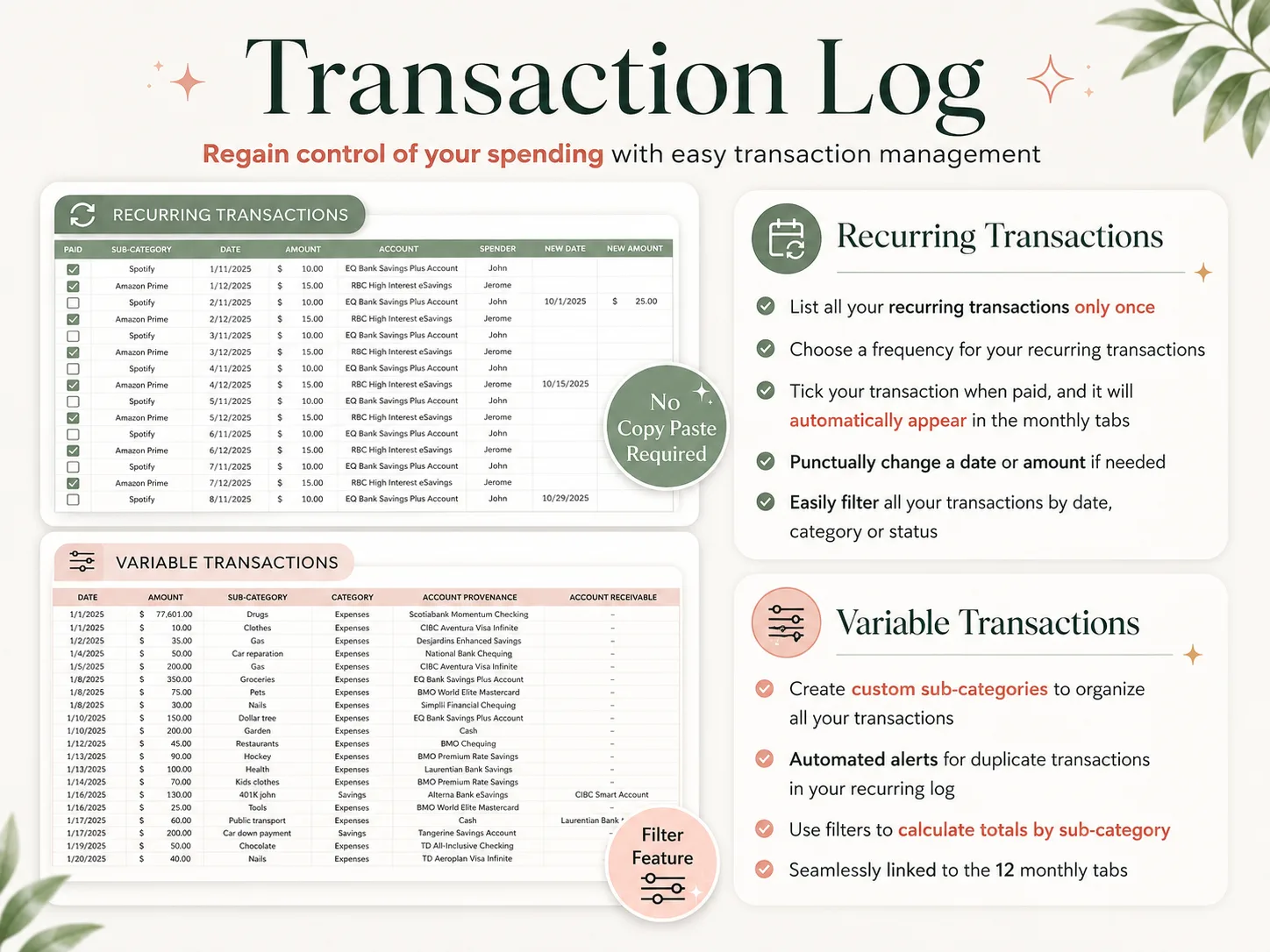
The fix is an old one: keep one table of money in and money out. Give each row a date, an account, a category, a sub-category, an amount and a paid tick. Everything else is a formula asking that table a question, such as how much went to groceries in October or what is still unpaid before the 23rd.
SUMIFS is the spreadsheet function that adds up only the rows matching several conditions at once, like category, month and paid status. Microsoft documents the SUMIFS function, and Google Sheets uses the same syntax.
Recurring money gets one extra column: frequency. Rent is every month, the paycheck every 2 weeks, car insurance every 6 months; you enter each once and the sheet repeats it.
Budget Spreadsheets: The Decision Table
Which setup you need depends mostly on how you are paid and how many accounts you juggle.
| Setup | What it handles | Where it breaks | Best for |
|---|---|---|---|
| One monthly tab | Planned vs actual by category | Biweekly pay, credit cards, yearly bills | Salaried, one account, few bills |
| Twelve monthly tabs, typed | A full year side by side | Every recurring bill is typed 12 times | People who enjoy the monthly reset |
| Transaction list + linked views | Month, paycheck, calendar, year from one list | You learn the list's columns first | Biweekly or uneven pay, 2+ accounts |
| Budgeting app | Bank import, phone entry, reminders | Subscription, bank login, sync breaks | Couples sharing live, on-the-go entry |
If you sit in the third row, the build below is for you. If you sit in the fourth, the comparison of cheaper YNAB alternatives covers which apps keep the same method for less.
The Worked Month: $1,950 Every Other Friday
[Original data] This month was built line by line in the planner's own tabs. The numbers are illustrative, not a customer's data.
Here is one ordinary month for a single earner. Take-home pay is $1,950 every two weeks. That is 26 paychecks a year, or $4,225 a month on average ($1,950 × 26 ÷ 12). Rent is $1,350, due on the 1st, and there are 11 bills in all.
| Line | Money in | Money out | Left |
|---|---|---|---|
| Paycheck 1 (Fri 9 Oct) | $1,950 | $1,950 | |
| Paycheck 2 (Fri 23 Oct) | $1,950 | $3,900 | |
| 11 bills (rent $1,350, car $310, student loan $210, insurance $140, electric $95 and 6 smaller) | $2,334 | $1,566 | |
| Groceries $520, gas $160, eating out $140, household $80, personal $90 | $990 | $576 | |
| Sinking funds (registration, gifts, 6-month insurance) | $300 | $276 | |
| Savings transfer | $276 | $0 |
[Unique insight] The yearly average is the wrong number to budget from. A plan built on the $4,225 average would spend $4,024 and come up $124 short in 10 months of the year. Only two months have a third payday. Plan the ordinary month on the $3,900 you will receive in a normal month instead. As a result, the two extra $1,950 paychecks arrive as a bonus with a job already chosen for them.
Step 1: List Accounts and Recurring Money Once
Start with the accounts where your money sits, for instance: a checking account, a savings account, one credit card. Give each account its current starting balance.
Then list every recurring line with five fields: name, amount, frequency, first date and account. On the worked month that is 1 paycheck and 11 bills, so 12 rows. The paycheck is one series, $1,950 every 2 weeks from 9 October, and the sheet generates both October paydays from it. Do not add a second row for 23 October, or every payday from then on counts twice.
Compare that with typing into twelve monthly tabs. There, the paycheck alone is 26 entries a year, and each monthly bill another 12. Entered once with a frequency, the whole set stays at 12 rows.
Each time a bill clears, tick it paid instead of retyping it. Google Sheets has native checkboxes for this, and Excel can do the same with a TRUE/FALSE column.
Step 2: Log Variable Spending Where You Spend It
Groceries, gas and restaurant meals do not repeat on a predictable schedule, so they go on a variable list: date, amount, category, sub-category, account.
This is the spreadsheet's weakest point. A budgeting application imports these automatically; a sheet does not. Readers who abandon spreadsheets usually describe the same experience: purchases pile up, and the Sunday catch-up gets skipped.
Two habits fix most of it. Keep the sheet open on your phone in the Google Sheets app and add a line at the till. Alternatively, take two minutes each evening with your banking app open next to the sheet. On the worked month that is roughly 40 variable entries, about 10 a week.
Step 3: Let the Month Read the List
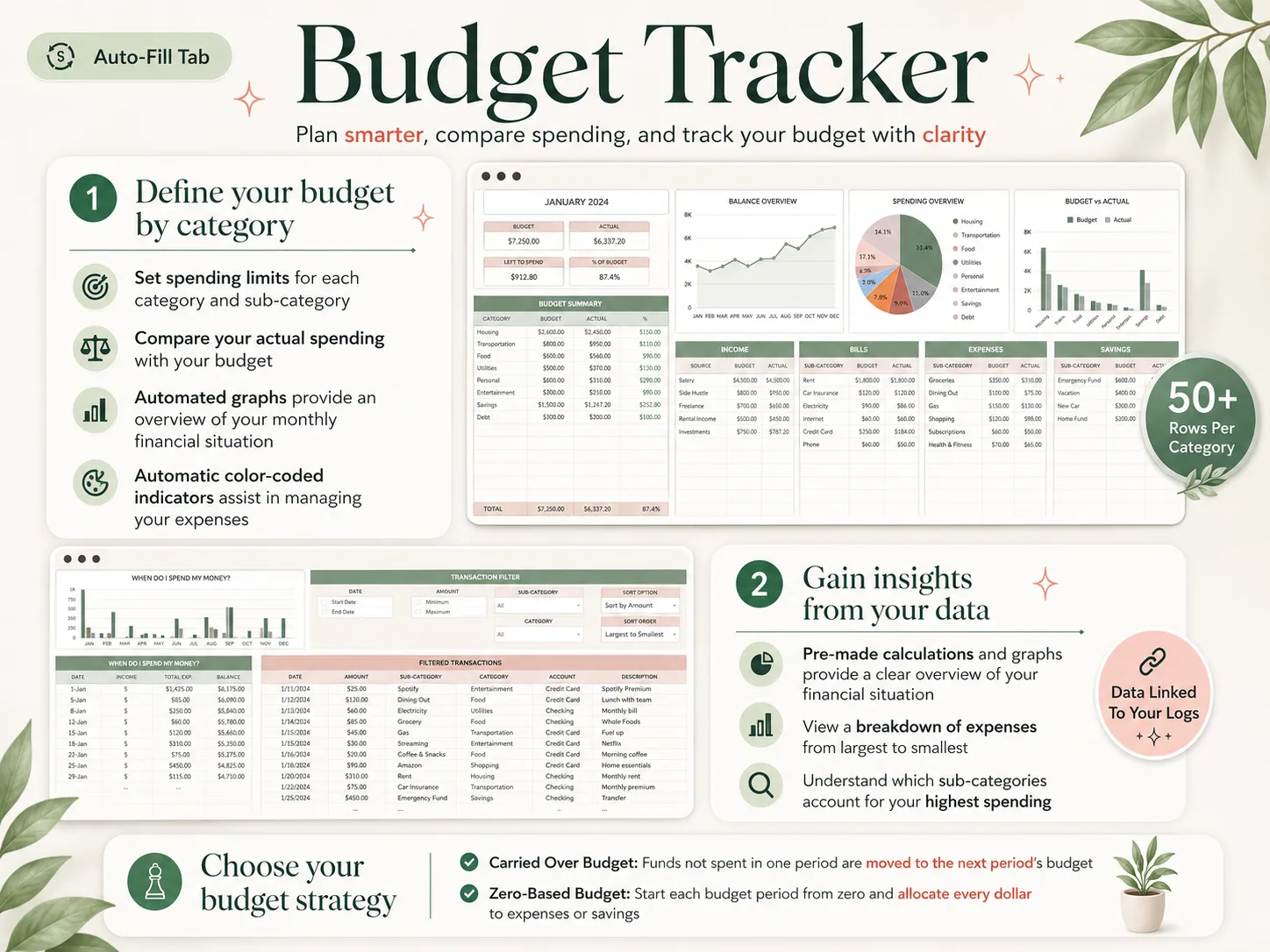
The monthly tab should hold only your category targets. The actuals come from SUMIFS on the lists, filtered by category, month and paid status.
In October, for instance, groceries has a $520 target. Each grocery line on the variable list lands in the actual column, and the difference shows as left to spend. A conditional color rule turns the cell red when actual passes target, and after that there is no typing on this tab.
Decide here whether unspent money carries over to next month or each month starts from zero. Both approaches work fine. In particular, a carried-over budget suits people who build up categories slowly. A zero-based budget suits people who want every dollar of the $3,900 placed before the month starts, as in the table above.
Paycheck Timing Matters More Than the Monthly Total
The monthly total can balance while a single paycheck runs dry. That is the "down to barebones by day 5" feeling many biweekly earners describe, and it is a timing problem.
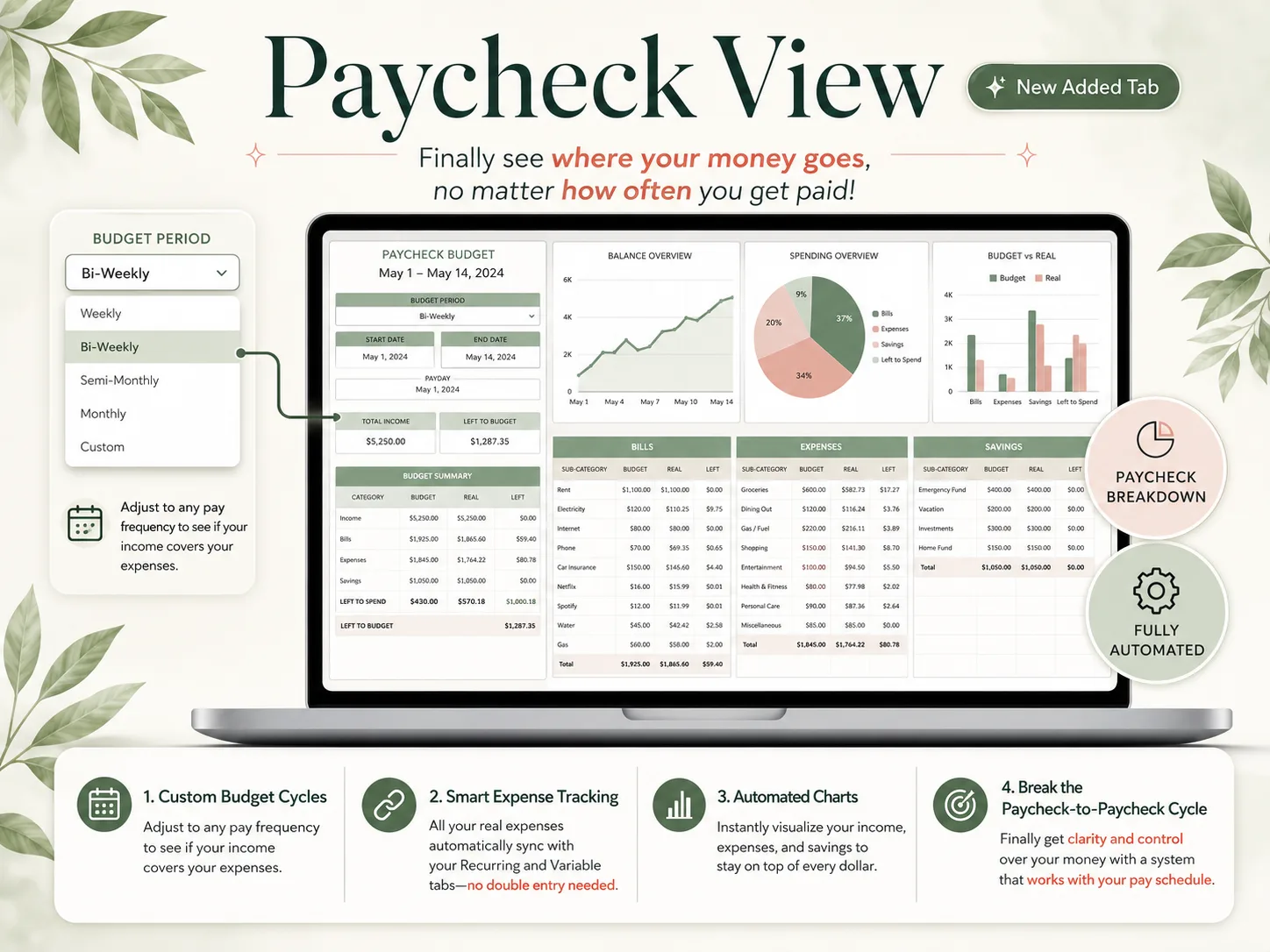
On the worked month, rent of $1,350 is due on the 1st, before October's first paycheck on the 9th. So rent has to come out of the 25 September paycheck. That check also covers the renters insurance, gym membership and internet bills due before the 9th. In total it carries $1,463 of bills before groceries, while the 9 October paycheck carries only $661.
A paycheck view is a budget grouped by pay period instead of calendar month. Set the cycle (weekly, biweekly, semi-monthly or custom), and each period shows its income, its bills and what is left to spend until the next payday. The CFPB's Your Money, Your Goals toolkit includes a bill calendar and a cash flow budget for the same reason.
The Part Most Budget Templates Leave Out
The usual template stops at a monthly tab with planned and actual columns, and leaves out four pieces.
Yearly bills need a monthly number. Car registration, a 6-month insurance bill and holiday gifts wreck the month they land in. A sinking fund is money you set aside each month for a bill that arrives later. Divide each yearly cost by the months until it is due, and move that amount every month.
A calendar catches what a table hides. Seeing $1,463 of bills stacked in the first week next to $661 in the second makes the paycheck problem obvious, which a single column total never reveals.
Fewer categories survive longer. For example, eight to twelve categories you review beat forty you ignore. Use sub-categories for the detail and keep the top-level category list deliberately short.
The year is where patterns show. However, one expensive month is just noise. Twelve months side by side show that car costs ran $380 a month, not the $310 you planned. If the spreadsheet does all of this from one list, a budget template with the calendar, paycheck view and yearly totals already linked saves you the build.
Why Trust This Article
We are the Cosmo Suite team that builds and sells the Ultimate Budget Planner, so we have a stake in this topic. The setup steps above still work in any spreadsheet, including one you build yourself.
Methodology: the worked month is an illustrative example built in our own template, not a customer's data, and every total in it can be recomputed from the lines shown. Formula behaviour comes from Microsoft's and Google's help pages. Spending shares come from the BLS Consumer Expenditures 2024 release (published December 2025). All sources were checked on 3 October 2026.
Read more about us and our editorial policy, or contact us through the site footer. Verify against your own bank statements before you act on any number.
Where the Ultimate Budget Planner Fits
The difficult part of a budget spreadsheet is keeping several views consistent with one set of transactions. The Ultimate Budget Planner is that wiring already built, in one file for Excel and one for Google Sheets.
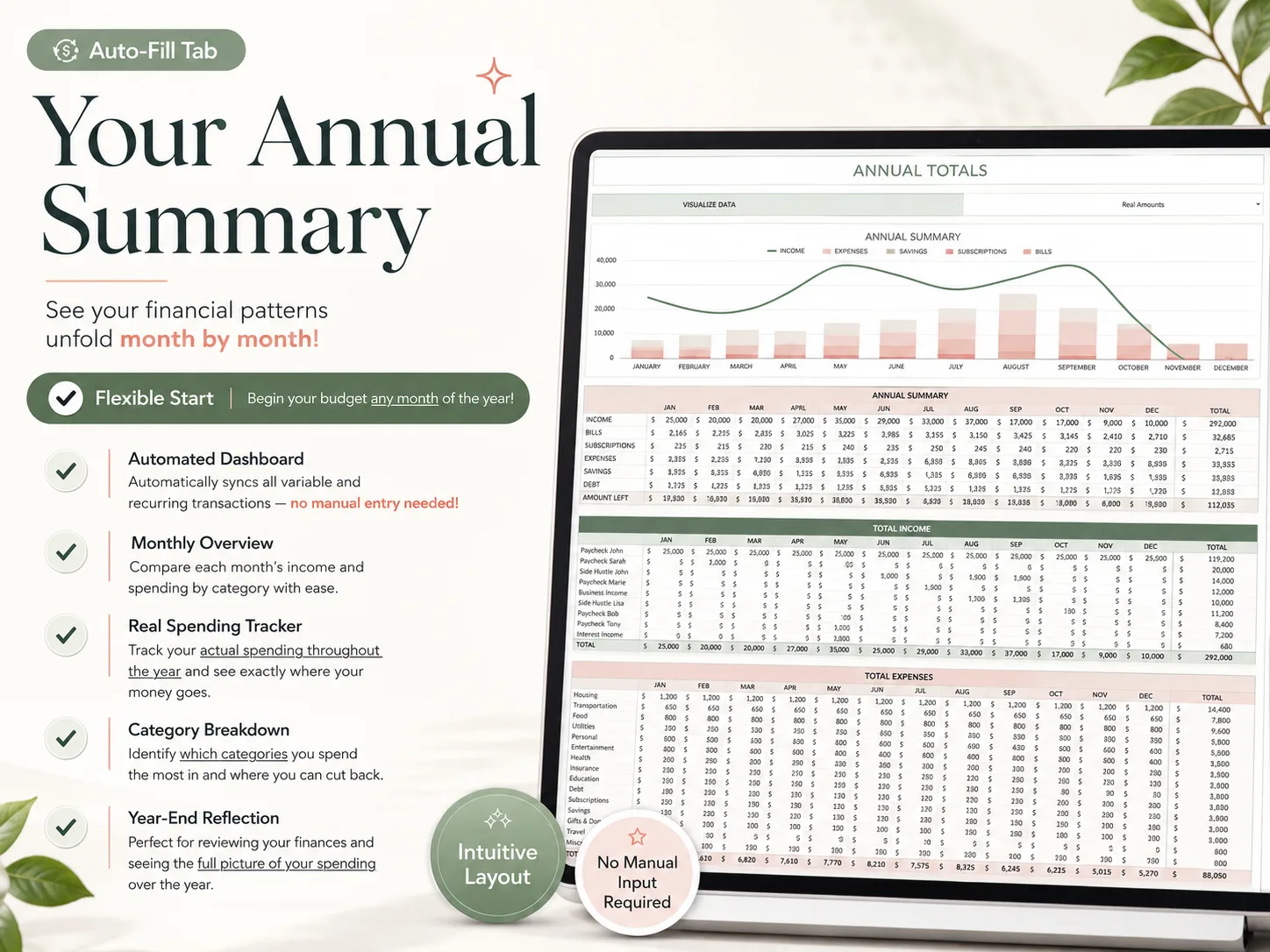
It has 28 tabs in 4 sections. Transactions holds Easy Setup, Bank Accounts, Recurring, Payments and Variable. Dashboards holds the All-in-One dashboard, Annual Totals, an Automated Calendar and the Paycheck dashboard. Then come 12 Monthly Budget tabs. Finally, there is a Build Your Wealth section with 50/30/20, Expense Distribution, Sinking Funds, a Debt Calculator, Net Worth, an Investment Forecast and a No-Spending Challenge.
On the worked month, the 12 recurring lines go on the Recurring tab once. The paycheck is a single every-2-weeks row, and the bills each have their own frequency. Each generated date gets ticked when paid, and groceries and gas go on Variable. The October tab, the paycheck view, the calendar and the annual totals fill from those entries. You can start at any month and pick a carried-over or zero-based budget.
It is $9 once and reusable every year, with a setup PDF and a YouTube tutorial. If you would rather build in Google Sheets yourself, start with the Google Sheets budget template layout to copy. To see every tab first, the Excel and Google Sheets budget planner page has a screenshot of each one.
Frequently asked questions
Which budget spreadsheet is best for me?
It depends on how you are paid and how many places your money sits. One monthly paycheck and one account work fine on a single sheet. Biweekly or uneven pay, a credit card or two and yearly bills need a transaction list that feeds a monthly view and a paycheck view, so you are not keeping two budgets in step by hand.
How much does a budget spreadsheet cost?
It can cost nothing. Google Sheets and Excel both ship free starter templates, and a home-built sheet costs only your setup time. Ready-made files with linked tabs usually sell as a one-time purchase; the Ultimate Budget Planner is $9 once for the Excel and Google Sheets versions, with no subscription.
Can I use the same budget spreadsheet in Excel and Google Sheets?
Yes, if it was built for both. Basic SUMIFS totals, dropdowns and checkboxes exist in each, but some formulas and charts behave differently after a conversion. Pick a template that ships a separate Excel file and Google Sheets copy, or test the converted file for a month before you trust it.
How long does it take to set up a budget spreadsheet?
Plan on one sitting of about an hour for the first month: list your accounts, enter recurring bills once with their frequency, set category targets and add the transactions since your last payday. After that, a short routine of two to five minutes after each purchase or each evening keeps it current.
What is the difference between a budget spreadsheet and a budgeting app?
An app pulls transactions from your bank and reminds you on your phone. A spreadsheet asks you to type or paste transactions yourself, and in return you own the file, pay no subscription and can change any category or view. Readers who refuse to share a bank login usually end up on a sheet.
What is the fastest way to start a budget spreadsheet that updates itself?
Start from a file whose tabs are already linked. In the Ultimate Budget Planner you add your accounts, enter recurring bills and paychecks once with a frequency, then log variable spending as it happens; the monthly tabs, dashboards, calendar and annual totals fill from those entries.