7 Cheaper YNAB Alternatives That Do the Same Job (2026)
YNAB alternative picks that cost less: 7 options from free to $99 a year, with 3- and 5-year costs from official pricing pages and which keep zero-based.
By Ultimate Budget Planner by Cosmo Suite · Editorial policy
Published · 7 min read
People leave YNAB for one of three reasons. The renewal came in higher than they remembered. They never liked handing a budgeting company their bank login. Or the bank connection broke one month, the numbers stopped matching, and they stopped opening the app.
Each of those is fair. Even so, several "best YNAB alternative" lists that rank for this search come from app companies. They put their own app first and skip the obvious question.
The question is what you would lose. YNAB is two things sold together: a method (give every dollar a job before you spend it) and a service (bank import, phone app, sync). You can keep the method without paying yearly for the service, in another app or in a zero-based budget spreadsheet you pay for once.
Here are seven cheaper options, sorted by which half of YNAB they keep.
Key takeaways
- YNAB costs $109 a year, which adds up to $327 over three years and $545 over five at today's price.
- Tiller, Simplifi and Goodbudget Premium keep a bank connection for $240 to $297 over three years.
- EveryDollar's free version, Actual Budget and a spreadsheet keep zero-based budgeting with no yearly bill.
- Most apps budget by calendar month, so biweekly earners lose the view of which paycheck pays which bill.
You Are Paying for the Sync, Not the Method
The method itself costs nothing. Zero-based budgeting is a method where income minus planned spending equals zero, because every dollar gets a category before the month starts. Ramsey's EveryDollar page describes it the same way. Any tool that adds up a list can run it, a one-time-purchase budget spreadsheet for Excel and Google Sheets included.
What the subscription buys is the service around the method. Bank sync is a paid feature that copies transactions from your bank into the app without typing. In addition, features such as shared access let your partner see the same numbers on their phone.
That service is worth paying for if you will not type purchases yourself. It is not worth paying for if the bank link is the part that keeps breaking, or the part you never wanted.
YNAB lists $14.99 a month or $109 a year on its official pricing page, checked 3 October 2026, with a 34-day trial and no free plan. At $109 a year, that is $327 over three years and $545 over five, if the price holds.
YNAB Alternatives: The Decision Table
[Original data] We built this table from each company's own pricing page, checked on 3 October 2026. The three- and five-year totals are our own arithmetic, assuming today's price and the annual plan.
| Option | Price | 3 years | 5 years | Keeps zero-based? | Best for |
|---|---|---|---|---|---|
| YNAB (for reference) | $109/year | $327 | $545 | Yes | Hands-off bank import |
| Tiller | $99/year | $297 | $495 | You build it | Bank feeds into your own sheet |
| Simplifi | $6.99/month, billed yearly | $251.64 | $419.40 | Possible, but built around a spending plan | Automatic tracking, light planning |
| Goodbudget Premium | $80/year (free plan exists) | $240 | $400 | Yes, envelopes | Couples sharing envelopes |
| EveryDollar (free version) | $0 | $0 | $0 | Yes | Zero-based, typed by hand |
| Actual Budget | Free, open source | $0 + hosting | $0 + hosting | Yes, envelopes | Tinkerers who want YNAB's feel |
| Ultimate Budget Planner | $9 once | $9 | $9 | Yes, or carried over | Owning the file, any pay schedule |
The three alternatives with a bank connection cost $240 to $297 over three years, against $327 for YNAB. The last three keep the method and drop the bill.
Alternatives That Keep the Bank Connection
These suit readers who will not type purchases by hand. They want automatic synchronization, just cheaper or more flexible.
Tiller: your own spreadsheet with bank feeds
Tiller is the closest alternative to YNAB's automatic import. It pulls bank and card transactions into Google Sheets or Excel each day, and you budget in a spreadsheet you control. You build or adapt the budget layout yourself from Tiller's templates.
Best for: spreadsheet people who refuse to type transactions. Costs: $99 a year after a 30-day free trial, per tiller.com/pricing, checked 3 October 2026.
Simplifi: automatic tracking with a spending plan
Simplifi is designed mainly for monitoring spending. Quicken's app imports accounts and builds a spending plan from your income, bills and savings goals, then shows what is left. Quicken's Simplifi page says the plan can accommodate zero-based budgeting, but the default workflow differs. Simplifi starts from what is left after bills and savings, while YNAB asks you to assign every dollar first. You can run zero-based in Simplifi if you set it up that way.
Best for: people who want to watch spending more than plan it. Costs: listed at $6.99 a month billed annually on Quicken's Simplifi page, with a lower first-year promotional price shown when checked on 3 October 2026.
Goodbudget: envelopes you can share
Goodbudget belongs to the same family as YNAB. Envelope budgeting is a method where each spending category is an envelope of money, and you spend only what it holds. For example, the free plan gives 10 regular envelopes, 10 annual or goal envelopes, 1 account and 2 devices. Premium adds unlimited envelopes and accounts, 5 devices and bank sync for US banks.
Best for: couples who want to share envelopes on two phones. Costs: free, or $10 a month or $80 a year for Premium, per Goodbudget's subscription help page, checked 3 October 2026.
Alternatives That Keep the Method and Drop the Bill
These suit readers who liked the zero-based habit. They are fine entering transactions themselves, or they never wanted a bank link in the first place.
EveryDollar (free version): zero-based, typed by hand
EveryDollar's free version has no time limit. Ramsey built the app on zero-based budgeting, and the paid tier adds bank import, custom reports and coaching. If what you loved in YNAB was the start-of-month planning, the free version covers it.
Best for: zero-based budgeters happy to enter each purchase on their phone. Costs: the free version is $0. Premium is $79.99 a year or $17.99 a month after a 14-day trial, per Ramsey's EveryDollar page, checked 3 October 2026.
Actual Budget: the open-source YNAB look-alike
Actual Budget is free, open source software. It is built on envelope budgeting, so you can only budget money you have. It runs as a local application that synchronizes across devices. You either host it yourself or pay a small hosting service to run it.
Best for: people comfortable with a little setup who want YNAB's workflow without the fee. Costs: the software is free; hosting, if you use a service, is a small monthly fee to that host.
A Google Sheets budget you build yourself
A home-built sheet costs nothing but setup time. One transaction list and SUMIFS totals can run a zero-based budget, following the same three steps as the government's consumer.gov budget guide. The layout, columns and formulas are in this Google Sheets budget template walk-through.
Best for: people who enjoy building and maintaining formulas. Costs: $0, plus about an hour to set up and the time to build recurring bills yourself.
What You Give Up When You Leave YNAB
Leaving saves money, but it also costs some convenience. The right pick depends on which of these you can live without.
Entering transactions yourself. Without bank import, purchases get typed or pasted. Two minutes each evening with your banking app open is the routine most spreadsheet budgeters settle on.
Shared live numbers. YNAB, Goodbudget and Simplifi put the same budget on two phones. A shared Google Sheet does too, but an Excel file on one laptop does not.
Age of money and goals. YNAB's reports and targets are polished. A spreadsheet, by contrast, gives you whatever you build, or whatever the template includes.
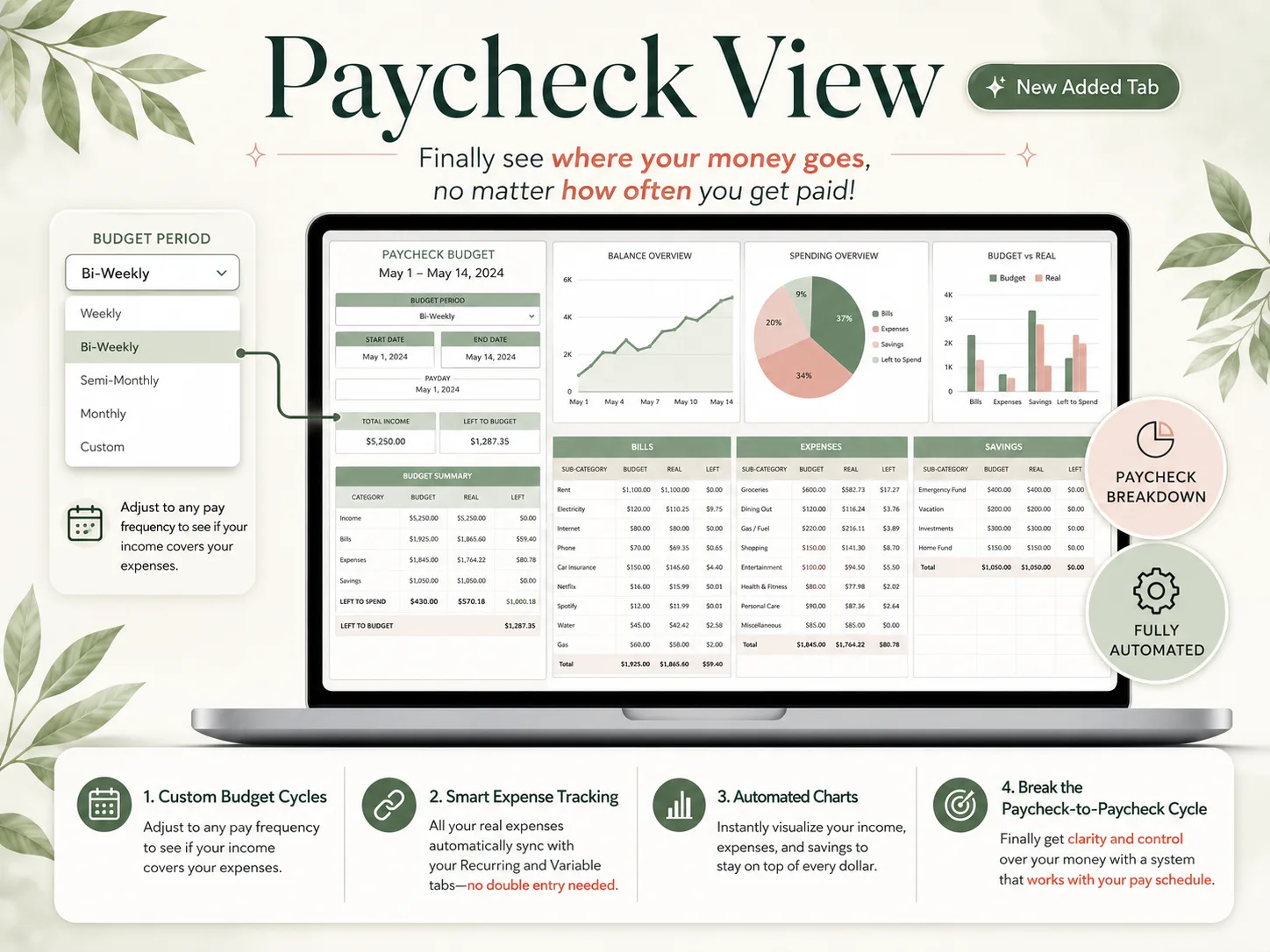
[Unique insight] Paycheck timing. Most of the apps above budget by calendar month, not by the paycheck that pays each bill. If you are paid every two weeks, a view of bills by pay period matters more than any report. In that case, a template can beat an app.
Why Trust This Article
We are the Cosmo Suite team that makes the Ultimate Budget Planner, one of the seven options. Read that entry knowing it is ours. We placed the apps with bank sync first because many readers need them.
Methodology: every price comes from the company's own pricing or help page, checked on 3 October 2026, and no price comes from a review site. The multi-year totals multiply each annual price by three and five. Prices change, so check each page before you buy.
Read more about us and our editorial policy, or contact us through the site footer.
Where the Ultimate Budget Planner Fits
A spreadsheet you own keeps the zero-based habit and drops the yearly bill and the bank login. That is the trade the Ultimate Budget Planner makes.
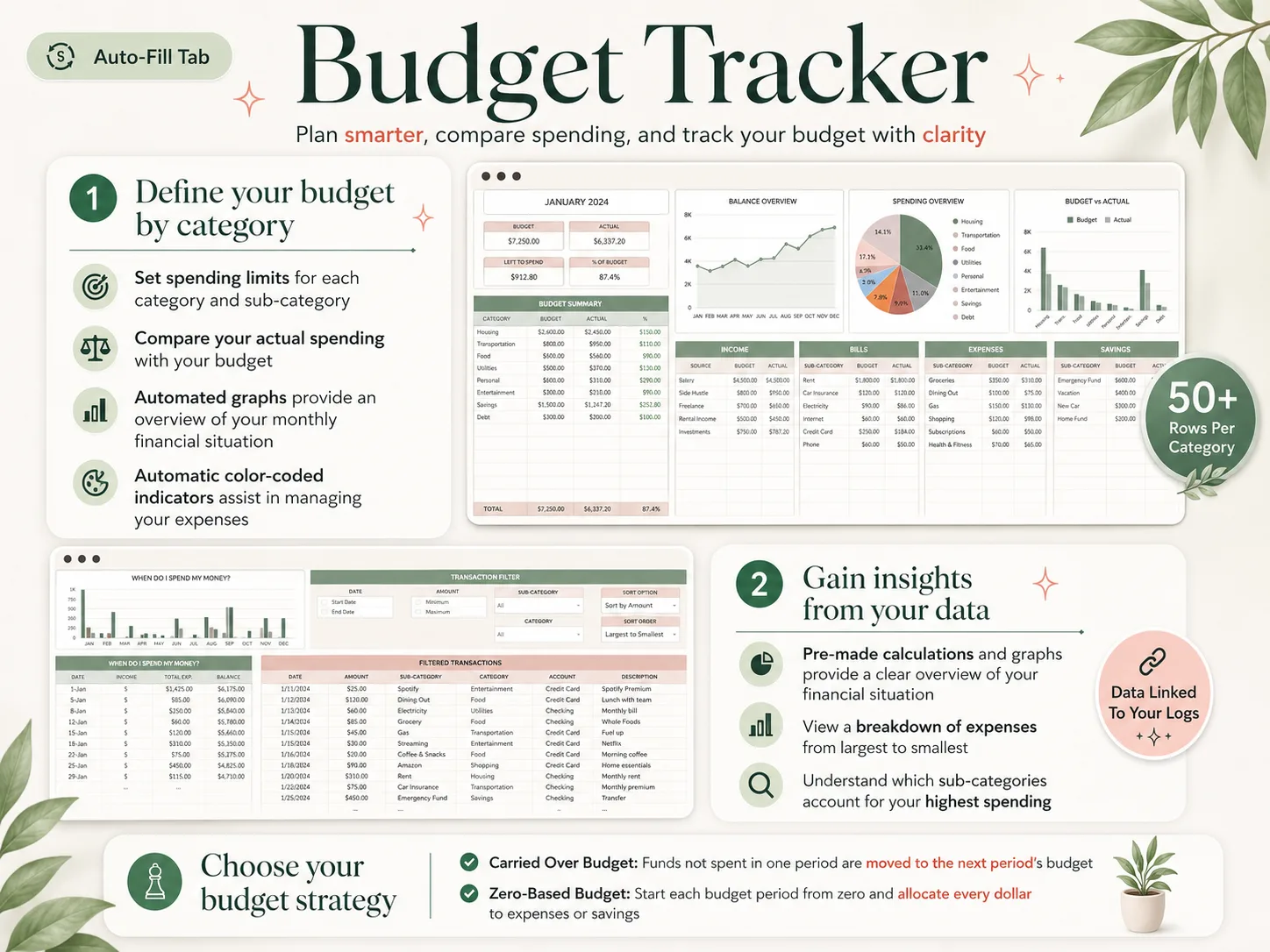
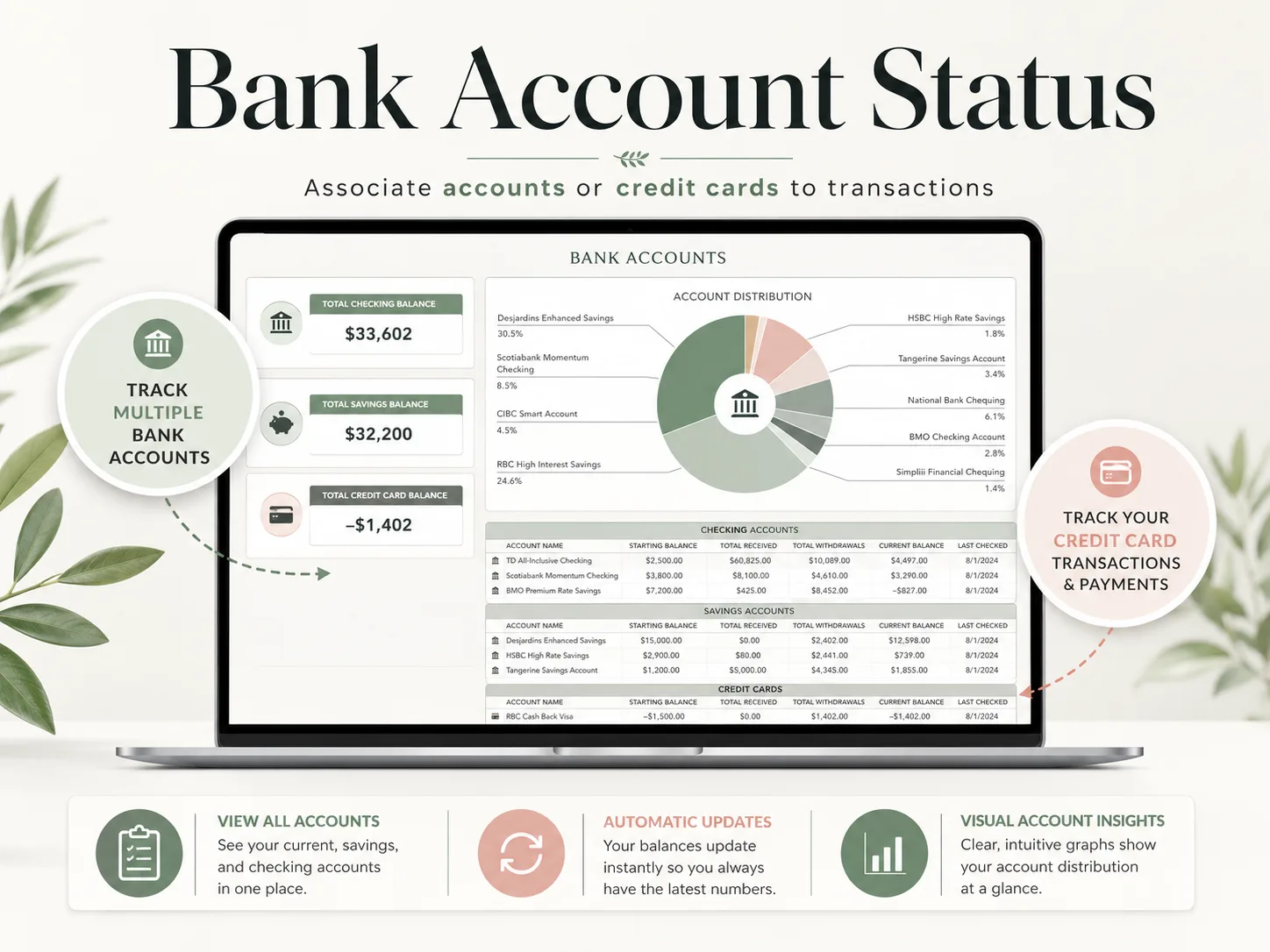
It is one budget spreadsheet in an Excel file and a Google Sheets copy, with 28 tabs in 4 sections. You choose a zero-based budget or one that carries unspent money forward. Recurring bills and paychecks go on the Recurring tab once with a frequency and are ticked when paid. Variable spending goes on its own list. The 12 Monthly Budget tabs, the All-in-One and Paycheck dashboards, the Automated Calendar and Annual Totals fill from those two lists.
The Paycheck dashboard handles weekly, biweekly, semi-monthly or custom pay, which is the gap most apps leave. It is $9 once against YNAB's $327 over three years, reusable every year, with a setup PDF and a YouTube tutorial. You will be entering transactions yourself, so read how a budget spreadsheet fills itself in once that list exists before you decide. Every tab is shown on the page for the no-subscription budget spreadsheet.
Frequently asked questions
Which YNAB alternative is best for me?
It depends on what you would miss. If you need your bank imported and a phone app, Goodbudget Premium, Simplifi or Tiller keep that for less. If you mostly want zero-based budgeting and no bill, EveryDollar's free version, Actual Budget or a spreadsheet keep the method and drop the subscription.
How much does YNAB cost in 2026?
YNAB lists $14.99 a month or $109 a year on ynab.com/pricing, checked 3 October 2026, plus any applicable tax, with a 34-day free trial and no free plan. Over three years the annual plan comes to $327, and over five years $545, if the price does not rise.
Can I run YNAB and an alternative at the same time?
Yes, during the trial or your last paid month. Export your YNAB budget and transactions, set up the alternative with the same categories, and log the same month in both. Once the two balances agree for a full month, cancel the one you are leaving.
How long does it take to switch from YNAB?
Plan on an evening. Exporting from YNAB takes minutes; the time goes into rebuilding categories, re-entering recurring bills and checking opening balances. Apps with bank sync fill transactions faster, while a spreadsheet asks you to set each recurring bill up once with its frequency.
What is the difference between YNAB and a budget spreadsheet?
YNAB imports transactions from your bank, runs on your phone and charges a yearly fee. A spreadsheet asks you to enter or paste transactions, and in exchange you own the file, pay nothing ongoing and can change any category, view or formula. Both can run a zero-based budget.
What is the fastest way to leave YNAB without losing the method?
Pick a tool that already supports zero-based budgeting and set it up before your renewal date. With the Ultimate Budget Planner you choose the zero-based option, enter recurring bills and paychecks once, and log spending as it happens; the monthly tabs show what every dollar is assigned to.
