Rocket Money Alternatives: Pick by the Money Job You Need Done
Rocket Money alternative: choose by job, from subscription cleanup and shared budgets to net worth tracking, with price checks and a spreadsheet option.
By Ultimate Budget Planner by Cosmo Suite · Editorial policy · Last updated
Disclosure: we make Ultimate Budget Planner, one of the two products compared here. Facts about Rocket Money come from its public pages, linked with the day we checked them.
The short answer
Keep Rocket Money if finding recurring charges, cancelling subscriptions or negotiating bills is your main job. Choose a budgeting app for a deeper plan, or a spreadsheet if you want a file you control and will enter transactions yourself.
Feature comparison
| Feature | Ultimate Budget Planner | Rocket Money | Notes |
|---|---|---|---|
| Find recurring charges | Partial | Yessource | Rocket Money identifies recurring charges after account linking. A spreadsheet needs the charges entered by you. |
| Request subscription cancellation | No | Partialsource | Rocket Money says hands-off cancellation is a Premium feature. |
| Budget categories and transaction rules | Yes | Yessource | Rocket Money offers automatic categorization and custom budget features; this planner uses manual entry and editable spreadsheet categories. |
| Bank syncing | No | Yessource | Rocket Money links financial accounts. The planner does not connect to a bank. |
| Net worth tracking | Yes | Partialsource | Rocket Money lists net worth tracking as a Premium feature; the planner includes a Net Worth tab. |
Pricing
| Product | Price | Checked |
|---|---|---|
| Ultimate Budget Planner | $9 one-time paymentOne-time purchase; the planner is a spreadsheet file with budget, bill, paycheck and yearly-total views. It does not connect to your bank or cancel subscriptions. | Our current price |
| Rocket Money | Free plan; Premium price varies by offer and platformRocket Money's help page says Premium uses a sliding scale selected at signup. Check the offer shown in your account before subscribing. Bill negotiation has a separate success fee. | As of · source |
Prices change. Rocket Money's price is as listed on its own pricing page on the day shown; check it there before you buy.
Who should pick which
Pick Ultimate Budget Planner if
- You want a budget file with paycheck, bill calendar and yearly totals in one workbook.
- You prefer manual transaction entry and want to keep the file in Excel or Google Sheets.
Pick Rocket Money if
- You want recurring charges found after linking financial accounts.
- You want a service to request cancellation of eligible subscriptions.
- You want bill negotiation or a mobile-first account overview.
Where Rocket Money is strong
- Recurring charges and subscriptions appear in one place after you connect accounts.
- Premium members can request subscription cancellations through Rocket Money.
- Rocket Money offers bill negotiation; its help page says it charges a percentage of first-year savings only when negotiation succeeds.
- A linked-account dashboard reduces manual transaction entry.
Rocket Money can be useful for several different money tasks: finding recurring charges, making category budgets, tracking balances and asking its team to cancel some subscriptions. If you searched for a Rocket Money alternative, the first step is to name the task you want to replace. A budgeting app and a subscription finder solve different problems.
Keep Rocket Money if subscription cleanup or linked-account visibility is the reason you use it. Look at another budgeting app if you want a different planning method or household setup. A spreadsheet fits if you want a budget file you control and accept manual entry.
Key Takeaways
- Rocket Money's strongest distinction is linking accounts to surface recurring charges and offering subscription cancellation to Premium members.
- Its Premium price is selected during signup and can vary. Check the current offer in your account.
- A budgeting app may fit better when you want a guided plan or automatic transaction updates.
- A spreadsheet trades automatic syncing for a file you can edit and keep.
Rocket Money Is Built Around Linked Accounts and Recurring Charges
Rocket Money connects financial accounts so you can see transactions, recurring bills and subscriptions in one place. Its free plan includes subscription tracking and budget features. Its help center lists subscription cancellation, net worth tracking and advanced transaction tools among Premium features. Exact feature access can change, so check Rocket Money's current plan details.
That arrangement is useful when the problem begins with a bank statement. A recurring charge you forgot about is easier to review when it sits beside other account activity. If you want Rocket Money's team to request a cancellation for an eligible service, the company says that option is part of Premium. Bill negotiation is a separate service with a success fee. See Rocket Money's current pricing help page for the offer and fee details that apply to your account.
The trade-off is that you need to link accounts for the automatic view. You also need to check the Premium offer shown to you rather than assume a single fixed price. Rocket Money's help page describes flexible pricing that can vary by platform.
Match the Replacement to the Task
| Your main job | What to look for | Where Rocket Money fits | Best for |
|---|---|---|---|
| Find recurring charges | Account linking and recurring transaction views | Built into Rocket Money | Keeping a clear list of subscriptions |
| Cancel subscriptions | A service that can contact providers | Premium cancellation requests | Reducing the calls and forms you handle |
| Plan a shared household budget | Shared access, categories and a method you will use | Budgeting features with account data | Monarch offers category or Flex budgeting and partner access |
| Assign money to categories | A method that tells each dollar where to go | Rocket Money provides category budgets | YNAB is built around assigning money to categories |
| Track net worth | Assets and debts in one place | Rocket Money lists it in Premium | Monarch Core includes net worth tracking |
| Own your budget file | Spreadsheet views you can edit | Not Rocket Money's main format | Manual control and a one-time file |
Treat the table as a shortlist. Before switching, verify a provider's current plan, supported accounts, export options and cancellation terms on its own site.
Choose a Budgeting App When Automation Matters Most
Choose a budgeting app if entering transactions or keeping a shared view current takes too much time. Account connections can reduce manual entry. Before switching, check the category limits, sharing options, supported banks, budget methods and paid features that matter to your routine.
Monarch is one option when you want a fuller shared household view. Its pricing page lists Core at $99.99 a year and describes both category and Flex budgets, net worth tracking and partner access. It also lists a $14.99 monthly option and a seven-day trial. Prices and plan details were checked on 19 October 2026, so confirm them before subscribing. It is a better fit when you want those shared and tracking features together.
Zero-based budgeting is a method where you assign the money available to categories for spending, bills or savings. YNAB's feature page describes assigning every dollar a job, with optional bank import, access across devices and subscription sharing with up to six people. It may fit if you want to plan as money arrives and are ready to maintain that method. If your main need is subscription cancellation, those budgeting tools do not replace Rocket Money's cancellation service. Compare the two on the job you want done first.
Rocket Money may already be enough if you want to see where money goes and review recurring charges. If your bigger need is a budget with more structure, compare alternatives on the routine they support. Can you give each paycheck a job? Can another household member see the same plan? Can you correct a miscategorized purchase without rebuilding the month?
Compare each feature with the routine you want. The app you keep using is the one that fits your pay schedule and how often you review transactions. Try one regular month and one unusual month, such as a three-paycheck month, before you move your records.
Keep Rocket Money if Subscription Cleanup Is the Main Need
If you signed up because of forgotten subscriptions, changing apps may not solve the original problem. Rocket Money says it tracks recurring charges on its free plan and offers hands-off cancellation to Premium members. If you only need a one-time cleanup, check the current upgrade terms and the time the company says a cancellation request may take.
If you do not need a service to contact providers, you can review recurring transactions yourself. Start with three months of account activity, mark charges that repeat, then confirm whether each one is still useful. A simple list with the merchant, amount, renewal date and cancellation route is enough to make a decision.
Keep a record of the result. Some services require you to cancel directly, and a card charge may continue until the provider confirms the cancellation. Check the merchant account as well as the transaction list.
Choose a Spreadsheet When You Want the Plan in Your Hands
A spreadsheet is a reasonable alternative when you already download statements or prefer to enter purchases in batches. You choose the categories and the file stays editable. You also take responsibility for adding transactions, correcting errors and updating account balances. The trade is simple: less automation, more control over the layout.
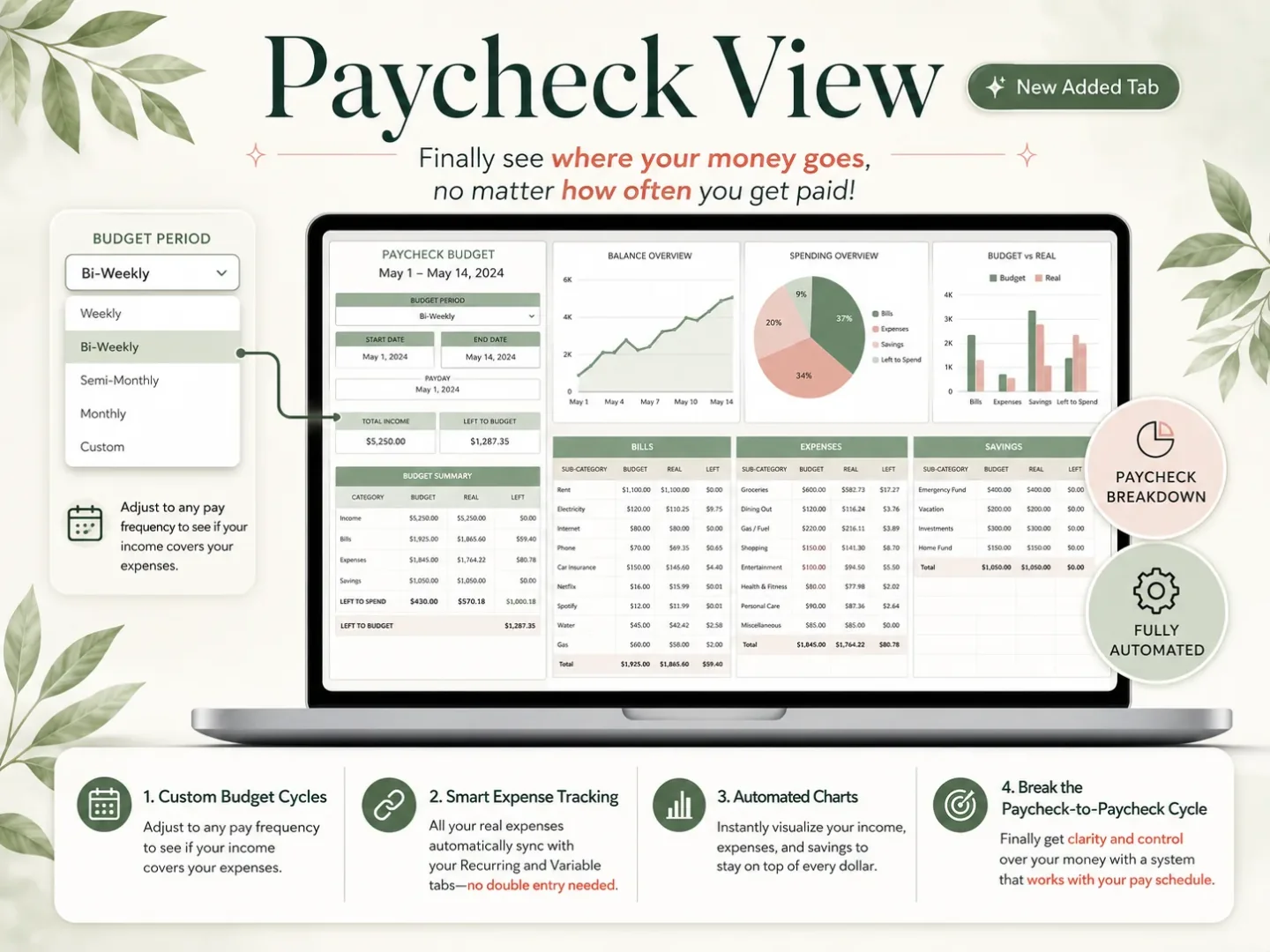
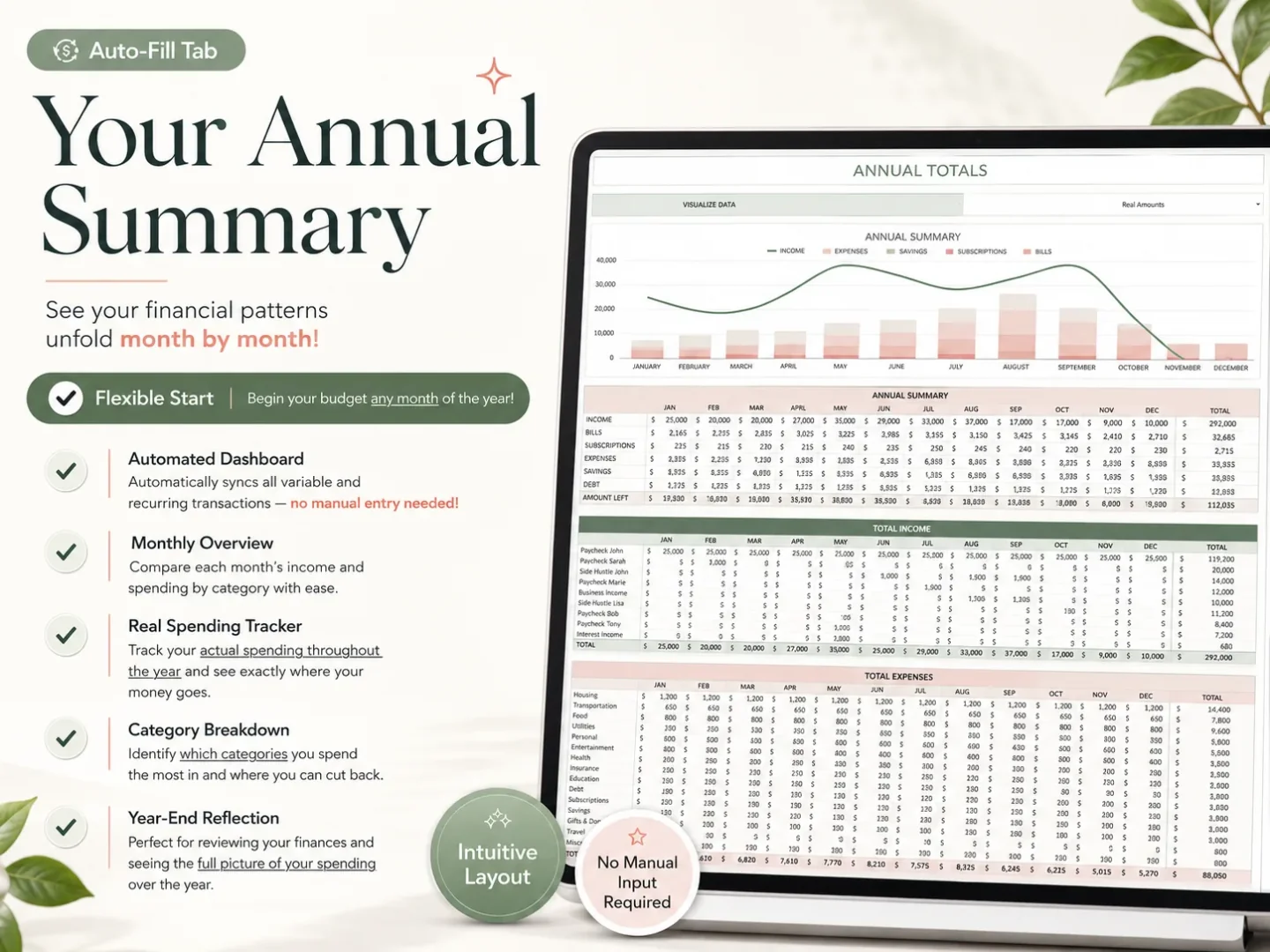
The Ultimate Budget Planner is a spreadsheet workbook with monthly budget and transaction views, paycheck planning, a bill calendar, annual totals and a net worth tab. It does not connect to your bank, detect recurring subscriptions or ask a provider to cancel a service. That makes it a poor replacement if those automatic tasks are why Rocket Money is valuable to you.
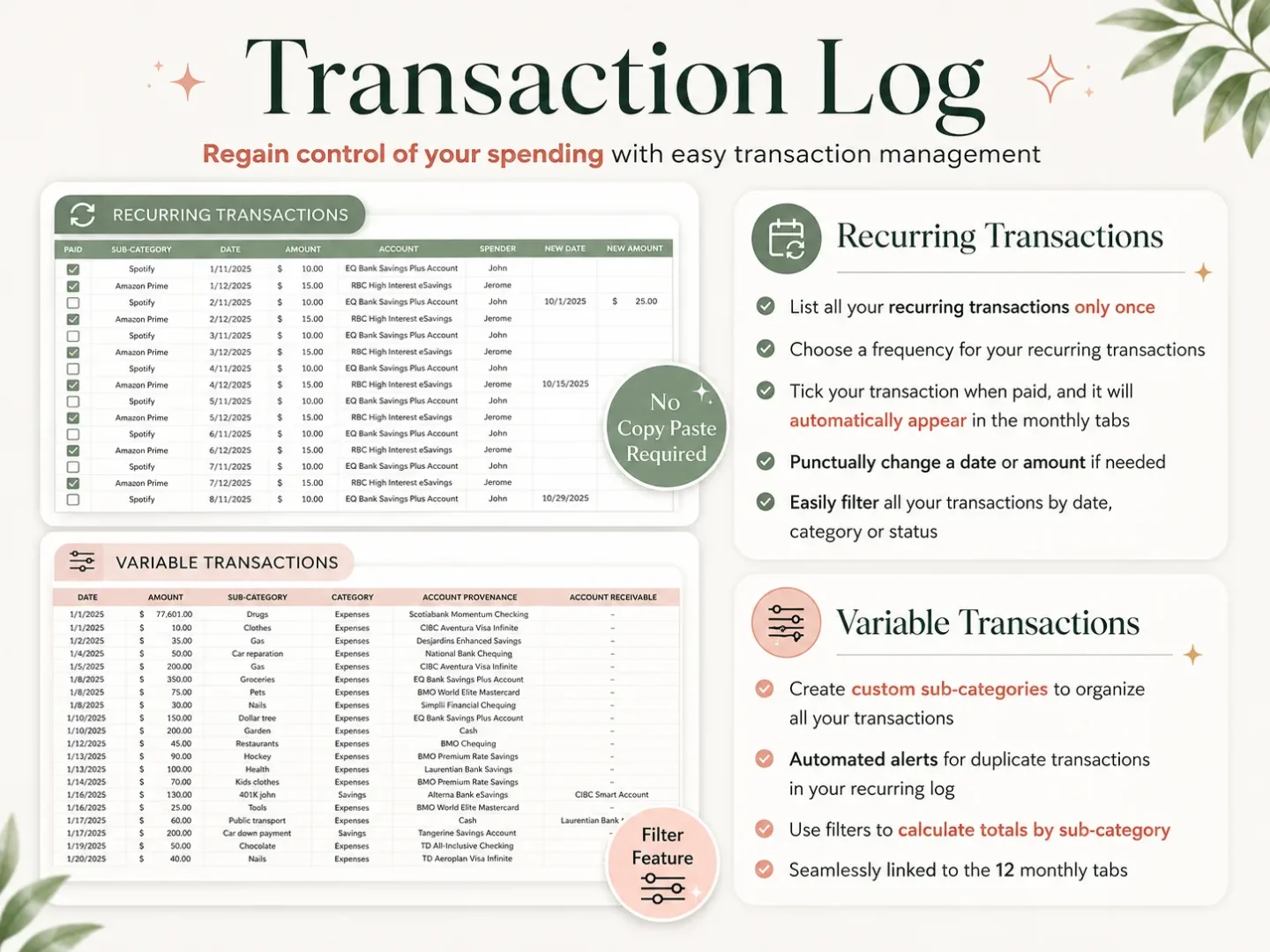
It can fit when you want one file for the budget mechanics. A transaction entered in the workbook can feed its monthly and yearly views. Use the paycheck view to plan bills against pay dates, then use the calendar to see what is due before the next deposit. The budget spreadsheet overview shows how those views relate.
For a broader tool comparison, see the Rocket Money vs Monarch guide. If your decision is more about budgeting method than account cleanup, the YNAB alternatives guide compares other approaches.
A Short Switch Test Prevents a Messy Move
Before cancelling anything, write down what you need to preserve: account balances, recurring bills, budget categories, subscription decisions and any records you may need later. Check whether your next tool can export or import the information you rely on. Do not assume that a new app will bring over every field.
Then try the new routine for one pay cycle. If you use a spreadsheet, enter transactions at a consistent time, such as after each payday or once a week. If you choose an app, confirm that linked accounts refresh and that its categories make sense. Compare your starting and ending balances with statements.
After the check, follow the provider's current cancellation instructions and confirm the renewal date. Keep the old workflow until the new one contains the records you need, then close the account you no longer use.
What Actually Decides Whether Rocket Money Is Worth Keeping
The decision usually comes down to which tasks you want handled for you. Rocket Money connects accounts and surfaces recurring charges. Its Premium membership adds tools such as subscription cancellation and net worth tracking. A budgeting app may give you a different planning routine. A spreadsheet gives you a flexible file but expects you to maintain it.
Try these checks before paying for a different product:
- List the job: subscription cleanup, transaction tracking, shared planning or paycheck budgeting.
- Check the boundary: see which features sit behind a paid plan and whether the provider supports your accounts.
- Test the routine: use one ordinary pay period and one irregular month.
- Keep your records: export or save anything you need before closing a paid account.
If you are reviewing a household budget, consumer.gov's Making a Budget guide offers a basic process: list income, track expenses and compare them. It is a useful starting point no matter which app or file you choose.
A Paycheck Routine Can Reveal a Poor Fit
Monthly summaries can hide the timing question that matters most: which deposit needs to cover a bill due before the following payday? If your pay arrives every two weeks, your calendar does not line up neatly with the month. A tool should let you see both the monthly plan and the bills between deposits.
Try this with a coming pay period. List the bills due before the next deposit, mark which paycheck will cover each one, and leave room for variable spending. Then compare the plan with cleared transactions. A spreadsheet can show the date and amount you enter; an app may update from linked accounts. Neither choice removes the need to check that the bill is assigned to the right period.
Use a practical test: can you tell what is committed, what remains available and what will arrive next? A budgeting app can keep a shared view current. If you prefer to organize the workbook yourself, inspect the planner's paycheck view before buying.
Why Trust This Article
We checked Rocket Money's help and FAQ pages on 19 October 2026. Features and pricing can vary by plan, account and platform, so confirm the current terms before you subscribe or switch. Ultimate Budget Planner is our product, and this page describes where its spreadsheet fits and what it does not do.
Where Ultimate Budget Planner Fits
Ultimate Budget Planner fits the manual-budgeting case: you want a workbook for monthly categories, paychecks, bills, annual totals and net worth. It is a downloadable spreadsheet, not a bank-connected app. You enter transactions and account balances yourself, so it will not identify subscriptions or cancel them.
If you value linked accounts and subscription management, keep evaluating Rocket Money or another app that supports those jobs. If you want to work in a file and see how one entry carries through multiple budget views, the Ultimate Budget Planner workbook is a practical alternative to compare. The right choice depends on the routine you will maintain.
Frequently asked questions
What is the best Rocket Money alternative?
It depends on the job you need done. If you mainly want a deeper budget, compare budgeting apps during their trials. If you want paycheck and bill views in a file you control, consider a spreadsheet. Keep Rocket Money if subscription finding or cancellation is still useful.
Is there a free Rocket Money alternative?
Yes. You can build a budget in a spreadsheet at no software cost, or compare the free tiers of budgeting apps. Check each provider's current limits before moving. A free spreadsheet still takes manual updates, and it will not find subscriptions from your bank statements for you.
Can I use Rocket Money just to cancel subscriptions?
Yes. Rocket Money's help pages say free members can view and track subscriptions, while hands-off cancellation is a Premium feature. Review the price and cancellation terms shown in your account before upgrading.
Does Rocket Money track net worth?
Yes, Rocket Money lists net worth tracking as a Premium feature. If you only need a periodic asset-and-debt total, a spreadsheet can also hold the figures, but you will update the balances yourself.
Can I keep Rocket Money and use a budget spreadsheet too?
Yes. You could keep Rocket Money for linked-account visibility or subscription cleanup and use a separate file for a budget structure it does not fit. Decide which app is the source of truth for each number so you do not count the same transaction twice.
How do I switch away from Rocket Money?
First save any records you want to keep, then list recurring bills, account balances and budget categories. Set up the new tool before ending a paid membership, check its export and cancellation instructions, and verify that all linked accounts or manual entries are accounted for.
