Excel Budget Templates Compared: Free Options and a Year-Long Layout (2026)
Excel budget template options compared: Microsoft's free gallery, Vertex42, Tiller and ours, plus a worked $3,900 month and five checks for a file that lasts.
By Ultimate Budget Planner by Cosmo Suite · Editorial policy
Published · 7 min read
You download a free Excel budget template in January and fill in the first month. By March it has stopped working, for one of three reasons. The file covers a single month, so you copy it and lose track of which copy is current. The car insurance that bills every six months is not on it anywhere. Or you type the same rent into two sheets and give up on the second.
All three happen to almost everyone, and none of them is a willpower problem. A template that survives the year is built differently from one that handles a single good month.
Below, the main free Excel templates side by side, a worked month that shows where one-month files slip, and the checks that tell you whether a file will still be open in November. If you would rather start from an Excel budget template that runs the whole year from one list, that option is covered too.
Key takeaways
- Microsoft's gallery and Vertex42 are free and good for a first month or a flat yearly plan.
- Free templates rarely handle bills that land in other months or a paycheck view.
- A biweekly paycheck makes two months a year bigger, so a flat monthly figure is wrong twice a year.
- Pick on how you are paid and how much you will type, not on how the file looks.
A Free Template Is Built for One Good Month
Most free Excel templates answer the question of what a typical month looks like, and they answer it well. Microsoft's gallery lists dozens of free customizable budget templates, including a basic personal budget, a personal monthly budget, a simple annual budget and a family budget (Microsoft Excel templates, checked 7 October 2026).
An Excel budget template is a ready-made workbook that compares planned and actual money in and out by category. A good first month needs nothing more than that.
The trouble starts in month two. Each month is a separate copy or tab, yearly bills have nowhere to live, and income is a single number even when your pay is not.
Excel Budget Templates: The Decision Table
Four routes cover most readers. The first three are the ones the top search results compare; the fourth is ours, so weigh it with that in mind.
| Template | Cost | What it covers | Best for |
|---|---|---|---|
| Microsoft gallery (personal monthly budget, simple annual budget) | Free | One month, or one flat year | A first try at budgeting |
| Vertex42 (personal budget, household budget worksheet, Money Manager) | Free for personal use | Yearly or monthly worksheets, one all-in-one workbook | People who like to adjust categories |
| Tiller Foundation Template for Excel | 30-day trial, then $99 a year | Bank transactions fed into a budget workbook | People who want automatic transaction entry |
| Ultimate Budget Planner | $9 once | 12 monthly tabs, recurring bills, paycheck view, calendar, yearly totals | Biweekly pay and bills before payday |
The free options do one job each. If that job is yours, use them and stop here.
The Worked Month: Where a One-Month Template Slips
The numbers below are illustrative, not a customer's data. The reader is paid biweekly, $1,950 take-home, so 26 paychecks a year. Ten months have two paydays and bring in $3,900.
| Line | Money in | Money out | Left |
|---|---|---|---|
| Two paychecks | $3,900 | $3,900 | |
| Rent, due the 1st | $1,350 | $2,550 | |
| 11 other monthly bills | $1,010 | $1,540 | |
| Groceries | $520 | $1,020 | |
| Gas, eating out, household | $460 | $560 | |
| Yearly costs set aside | $185 | $375 | |
| Savings transfer | $200 | $175 | |
| Left to spend | $175 |
Two things in that table break a one-month template. The $185 row belongs to bills that land in other months, and the template has no place for it. A sinking fund is money set aside each month for a bill that arrives later, such as insurance billed every six months.
The other is the income line. $1,950 times 26 paychecks, divided by 12, gives $4,225 a month on average. No month pays that. A template with a flat $4,225 income line shows you $325 you do not have in ten months, and $1,625 you did not plan for in the two months with three paychecks ($5,850).
Four Templates, One at a Time
Microsoft's Gallery: The Easy First Try
Open Excel, search "budget" and you have a working sheet in a minute. The templates are free and customizable, and the gallery covers personal, family and annual versions. Entries are typed by hand, and each month is its own file or tab.
Best for: your first month of budgeting. Costs: free, per the Microsoft Excel template gallery, checked 7 October 2026.
Vertex42: Free and Easy to Reshape
Vertex42 offers a yearly personal budget for one person, a monthly worksheet with the same categories, a household version and Money Manager, an all-in-one workbook for recording daily transactions. The site states every budget template can be downloaded for personal use at no charge.
Best for: readers who want to rename categories and see the formulas. Costs: free for personal use, per Vertex42, checked 7 October 2026.
Tiller: Bank Feeds Into a Workbook
Tiller sells a service rather than a file. Its Foundation Template for Excel, which Tiller calls the only automated Excel budget workbook recommended by Microsoft, is filled by the service's bank connection. That is a real advantage over any file you type into.
Best for: people who want transactions to arrive without typing and do not mind linking a bank. Costs: free for 30 days, then $99 a year, per Tiller pricing, checked 7 October 2026.
Ultimate Budget Planner: One List, Every View
This one is ours. It is a single Excel file, with a Google Sheets copy beside it, built so one entry shows up in the month, the paycheck view, the calendar and the year. It has no bank connection: you type your own transactions.
Best for: biweekly or uneven pay, and bills that land before payday. Costs: $9 once, with no yearly renewal.
What a Template Needs to Survive Twelve Months
Test whatever file you pick against five checks before you trust it with a year.
- Start any month. You should be able to begin in October without deleting January to June.
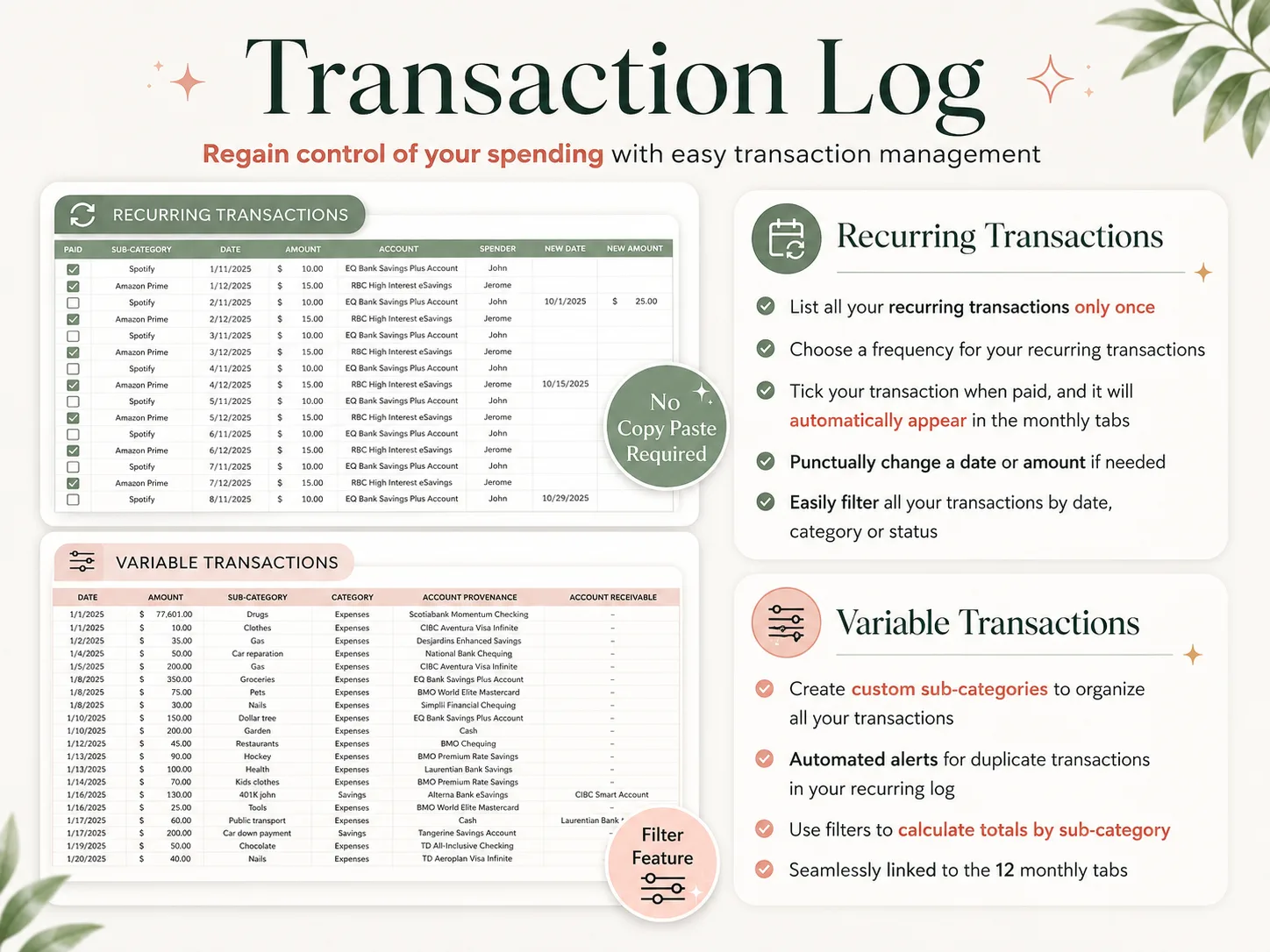
- A recurring list. Rent, phone and subscriptions are entered once, with a frequency.
- A place for yearly bills. Without it, the shortfall shows up all at once in December.
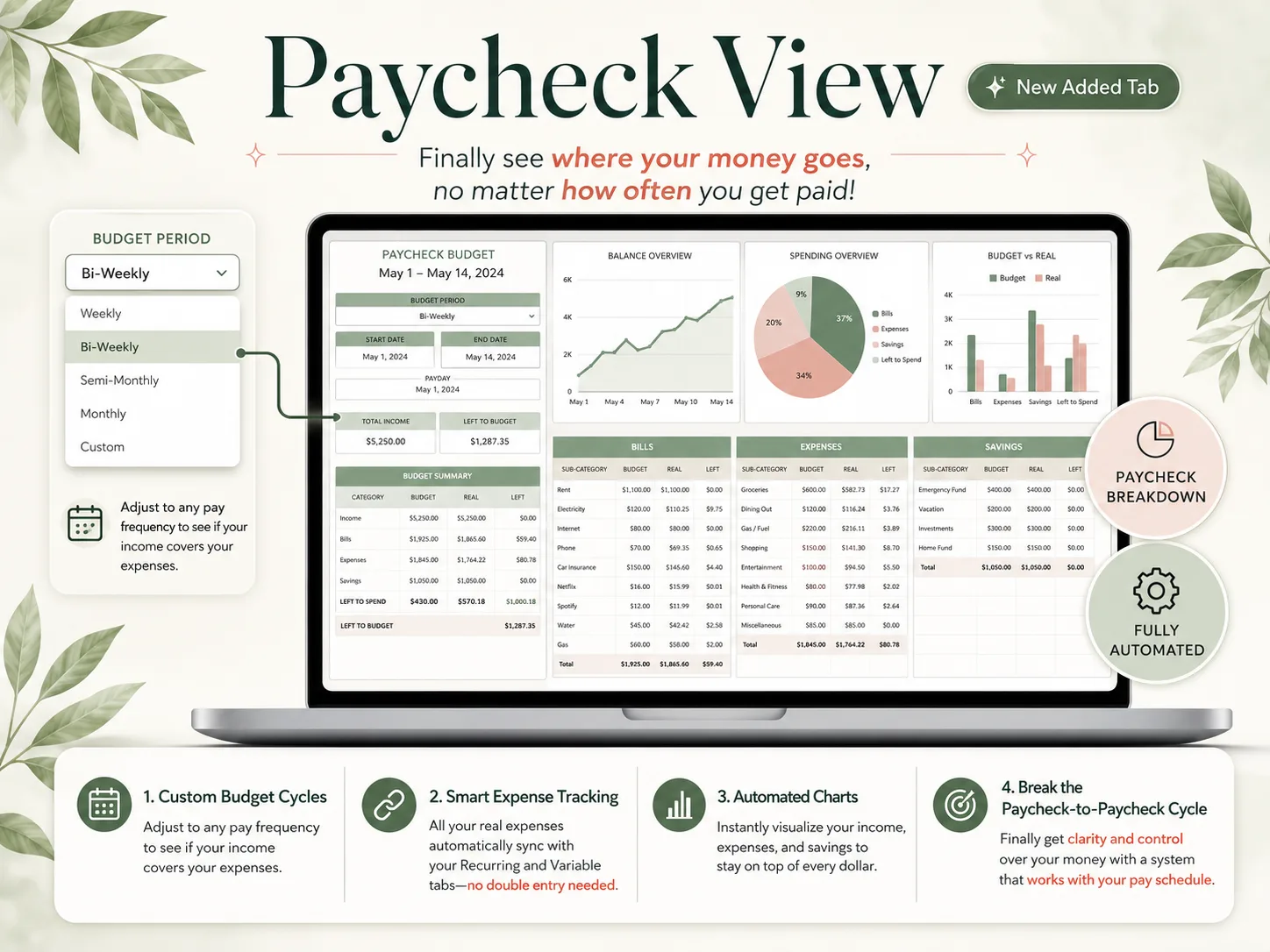
- Pay that matches yours. Weekly, biweekly or semi-monthly income should change the view, not just a number.
- One entry, several views. If you type an expense twice, you will stop typing it.
Dropdowns keep categories consistent, so "Groceries" is never spelled three ways. Excel's drop-down list feature adds them to any template you build or edit, using the Data Validation tool on the Data tab.
What Keeps You Using a Template Is How Little You Type
Budgets usually get abandoned over the weekly chore of typing, and the layout matters less. Bank feeds remove that chore, which is the case for an app or for Tiller. A file removes most of it when recurring items are set up once.
The routine is short. Once a week, take two minutes to log the spending that is not a bill: groceries, gas, eating out. Tick off the bills that cleared. Nothing else needs touching if the rest is wired to the recurring list.
The same logic applies to pay. With a biweekly check, a paycheck-based Excel budget with recurring bills built in shows what is left before the next payday, which a monthly total cannot.
Why Trust This Article
We are the Cosmo Suite team that makes the Ultimate Budget Planner, listed above as one of four options. The worked month and its numbers are illustrative, not a customer's data. We tried to describe the free options fairly and said where they are enough.
Template names, prices and trial terms come from each provider's own page, checked on 7 October 2026. The $4,225 average is our arithmetic on $1,950 across 26 paychecks. Prices change, so check each page before you commit. Read more about us and our editorial policy, or contact us through the site footer. For budgeting basics, the government's consumer.gov guide is a neutral reference.
Where the Ultimate Budget Planner Fits
If a free template already covers your pay schedule, keep it. If you are paid biweekly, or your bills land before payday, the bottleneck is the missing recurring list and paycheck view, and that is what the Ultimate Budget Planner adds.
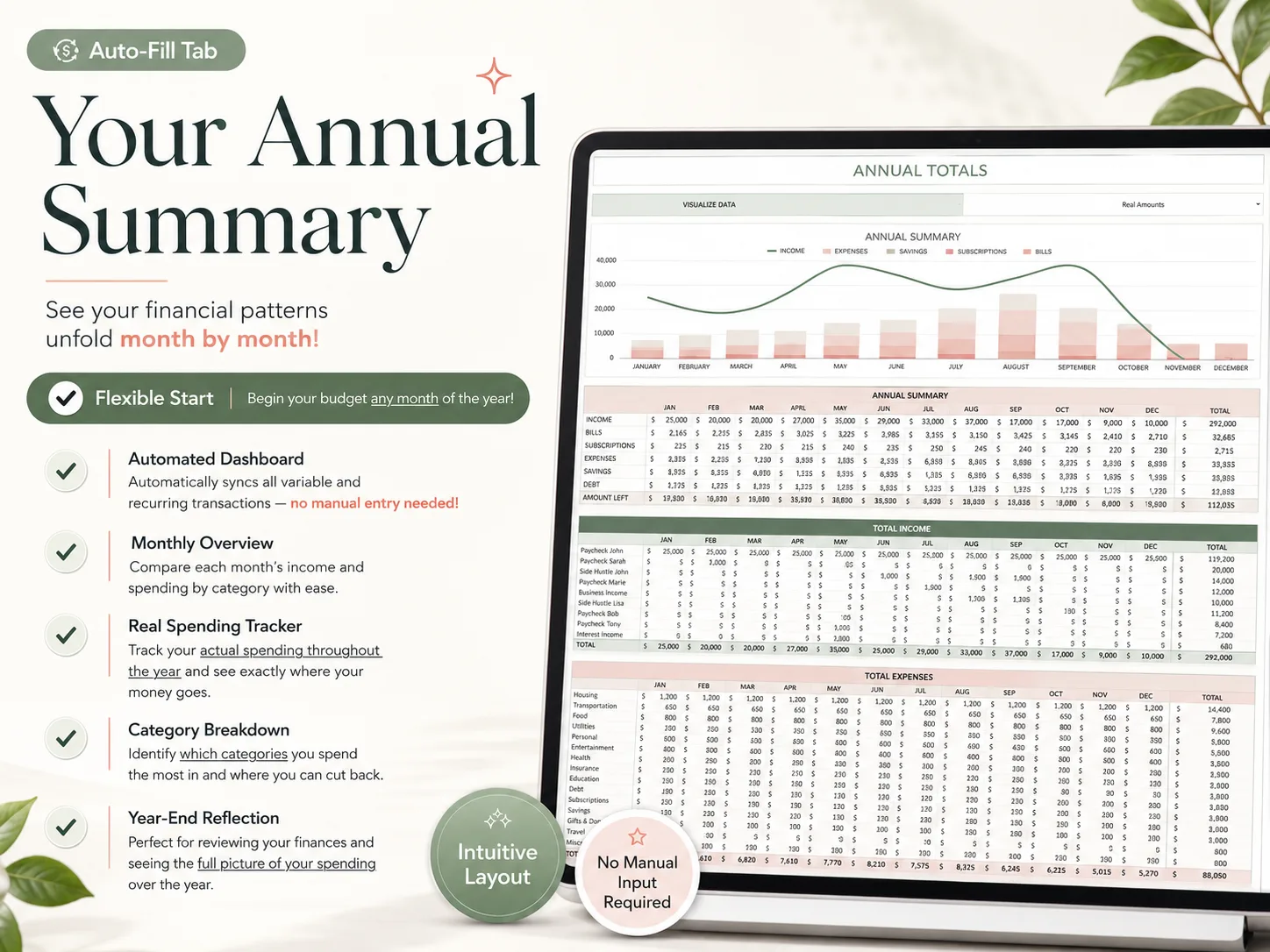
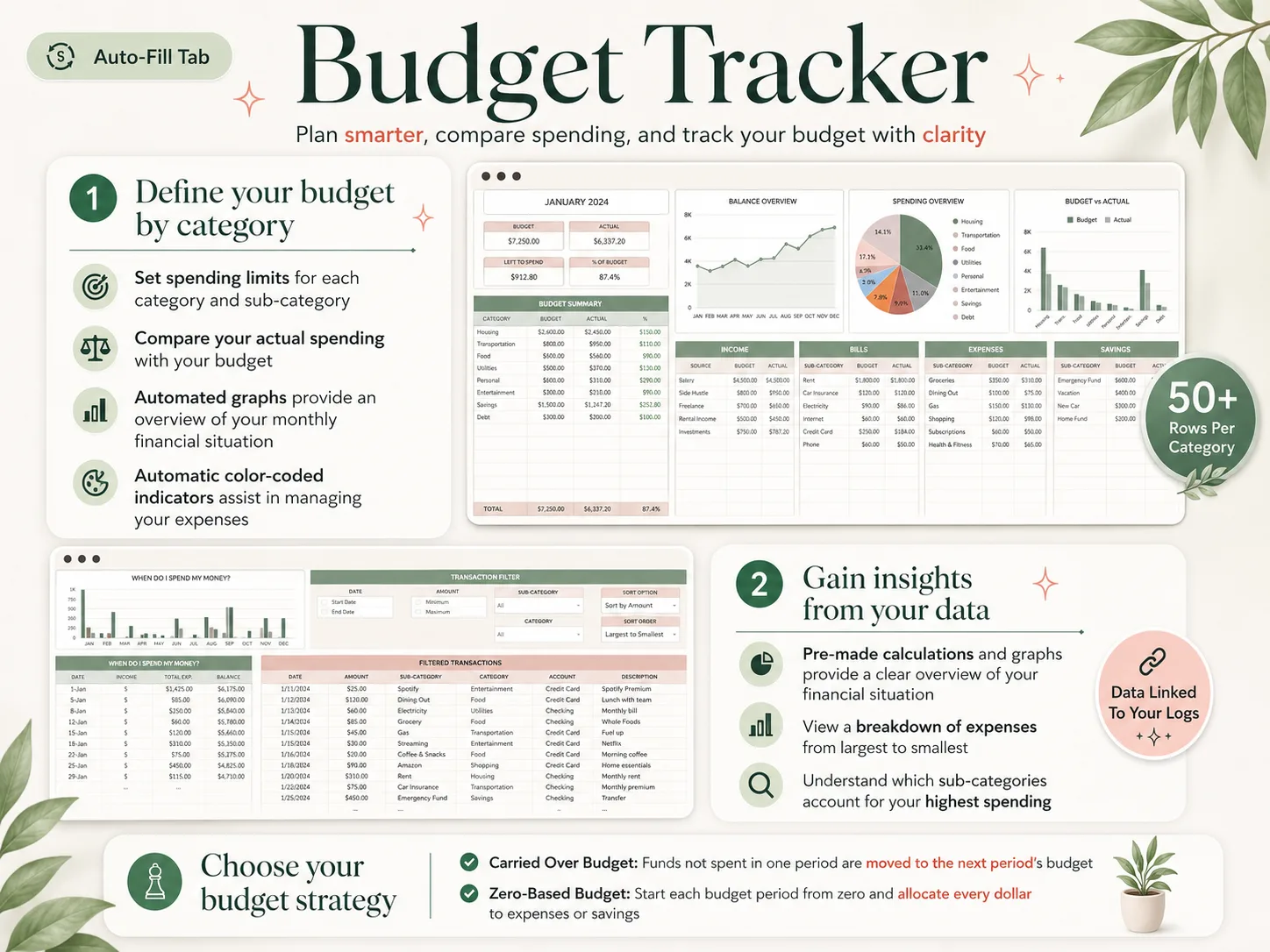
It is one budget spreadsheet in an Excel file and a Google Sheets copy, with 28 tabs in 4 sections. The 12 Monthly tabs start in any month and run carried-over or zero-based. Recurring bills and paychecks are entered once, in 7 frequencies, and ticked when paid. The Paycheck dashboard handles weekly, biweekly, semi-monthly or custom pay, and Annual Totals and the calendar fill from the same lists. It is compatible with Excel 365, and older versions of Excel may have limited functionality.
You type your own transactions, and there is no bank sync, so choose Tiller or an app if you will not keep that up. Otherwise it is $9 once, reusable every year, with a setup PDF and a YouTube tutorial. This guide to budget spreadsheets that fill themselves in shows how the tabs connect, and this Google Sheets budget template layout covers the same ideas if you share a file with a partner.
Frequently asked questions
Does Excel have a free budget template?
Yes. Open Excel, choose New and search for budget, or browse Microsoft's gallery of free customizable budget templates. It includes a basic personal budget, a personal monthly budget, a simple annual budget and a family budget. Most cover one month or one flat year, so check how each handles bills that land in other months.
What is the best free Excel budget template?
It depends on how you are paid. Microsoft's personal monthly budget is the easiest first try. Vertex42's yearly personal budget suits a steady salary. If you are paid biweekly or your bills land before payday, look for a template with a paycheck view and recurring bills, which free ones rarely have.
Can I use an Excel budget template on my phone?
Yes, with limits. The Excel mobile app opens and edits most workbooks on a phone or tablet, but setup is easier on a laptop. Entering a purchase on the go works well; rebuilding formulas or dropdowns does not. Google Sheets is the better pick if you and a partner both edit all day.
How do I make a budget in Excel from scratch?
List your take-home pay and every bill, then add one row per transaction with a date, category and amount. Total each category with a SUMIFS formula and compare it with a target. Add a recurring list for rent and subscriptions so you stop retyping them. Expect about an hour for the first month.
Is a paid Excel budget template worth it?
It can be, depending on your pay. A one-time $9 file like the Ultimate Budget Planner replaces an hour of building and keeps the tabs linked. It is not worth it if a free template already covers your pay schedule and you will keep it up. Skip any template that promises bank sync without a subscription.
What is the fastest way to get a working Excel budget?
Download a template whose tabs are already linked, then enter only your own accounts, bills and paychecks. In the Ultimate Budget Planner's Excel file you list recurring items once with a frequency and log everyday spending on one tab, and the monthly tabs, calendar and yearly totals fill in from there.
Sources
Keep reading
Budget Templates
Budget Spreadsheets That Fill Themselves In (Matched to How You Get Paid)
Budget spreadsheet setup for any pay schedule: one transaction list feeds the month, paycheck view, bill calendar and yearly totals, shown on a $3,900 month.
· 9 min read
Budget Templates
Google Sheets Budget Template: Copy the Layout and Customize It (2026)
Google Sheets budget template layout to copy: 6 columns, 3 formulas and the 4 things Google's free Monthly budget template leaves out, plus a worked month.
· 8 min read
